

Vetting a counterparty is often tied to numerous manual steps: finding the company using its Tax ID or other identifiers, reviewing the relevant information, assessing risks, and transferring the results into the corporate system. This process usually takes a considerable amount of time, relies on attentiveness of the employee and complicates monitoring of established procedures.
How can integration with Globas.API streamline counterparty screening?
Screening becomes part of the business process.
Screening can be embedded into processes that require counterparty assessment—such as creating a company or individual profile, procurement, contract approval, payment processing or shipment.
The employee does not need to switch between programs or manually transfer information each time. The necessary data moves directly from Globas into the corporate system where the primary task is performed.
Manual work is reduced
Automatic data migration lowers the risk of errors when transferring a company's Tax ID (INN), registration number (OGRN), address, status, and other information between the systems. Moreover, only the particular data required for a specific operation can be transferred to the corporate system.
The verification process follows a unified procedure.
Automation formalizes verification rules and helps apply them consistently across different departments. Different verification workflows can be used for different types of counterparties. For instance, the set of data to be verified and the subsequent approval may differ depending on whether the counterparty is a supplier, a customer, or a borrower.
Decisions are made faster
Automated screening allows employees to focus solely on situations requiring profound analysis.
For instance, if no factors requiring additional approval based on the corporate rules are detected, the process can proceed along the standard workflows. If significant risk factors are identified, the application can be automatically routed for additional review.
Globas data is combined with internal information
External data regarding a counterparty may not be sufficient for decision-making. The internal corporate system may already contain historical data of the cooperation with the counterparty, including its contracts, payments, outstanding debt, claims, and the results of previous screenings.
During integration, external data and analytical metrics from Globas are supplemented with information from internal systems. It is the company that defines the rules for using this data and makes the final decision regarding further interaction with the counterparty.
Screening history is preserved
Screening results can be documented directly in the workflow. The system stores information on who initiated the screening and when, the process under which it was conducted, and the results obtained. This enhances the transparency of internal controls.
Recurring screenings are becoming systematic
If the company deals with a large number of counterparties on a regular basis, integration can be used for recurring screenings and monitoring for changes.
Counterparties can be vetted according to established procedures, yet checking for significant changes can be delegated to a responsible employee. This approach ensures that information remains up-to-date throughout the entire period of partnership.
The employee does not need to switch between programs or manually transfer information each time. The necessary data moves directly from Globas into the corporate system where the primary task is performed.
Manual work is reduced
Automatic data migration lowers the risk of errors when transferring a company's Tax ID (INN), registration number (OGRN), address, status, and other information between the systems. Moreover, only the particular data required for a specific operation can be transferred to the corporate system.
The verification process follows a unified procedure.
Automation formalizes verification rules and helps apply them consistently across different departments. Different verification workflows can be used for different types of counterparties. For instance, the set of data to be verified and the subsequent approval may differ depending on whether the counterparty is a supplier, a customer, or a borrower.
Decisions are made faster
Automated screening allows employees to focus solely on situations requiring profound analysis.
For instance, if no factors requiring additional approval based on the corporate rules are detected, the process can proceed along the standard workflows. If significant risk factors are identified, the application can be automatically routed for additional review.
Globas data is combined with internal information
External data regarding a counterparty may not be sufficient for decision-making. The internal corporate system may already contain historical data of the cooperation with the counterparty, including its contracts, payments, outstanding debt, claims, and the results of previous screenings.
During integration, external data and analytical metrics from Globas are supplemented with information from internal systems. It is the company that defines the rules for using this data and makes the final decision regarding further interaction with the counterparty.
Screening history is preserved
Screening results can be documented directly in the workflow. The system stores information on who initiated the screening and when, the process under which it was conducted, and the results obtained. This enhances the transparency of internal controls.
Recurring screenings are becoming systematic
If the company deals with a large number of counterparties on a regular basis, integration can be used for recurring screenings and monitoring for changes.
Counterparties can be vetted according to established procedures, yet checking for significant changes can be delegated to a responsible employee. This approach ensures that information remains up-to-date throughout the entire period of partnership.
Integration of Globas with ELMA365: workflow scenario
One way to integrate counterparty screening into business processes is to use a ready-made solution for ELMA365. The Globas — Credinform solution, developed by Data Factory, is available in the ELMA365 Store. The solution is classified as an integration and a module and is designed to work with Globas data in ELMA365.
How the verification process works
Let us look at a typical scenario for verifying a counterparty during the approval process. The specific sequence of steps depends on the company's business processes.
How the verification process works
Let us look at a typical scenario for verifying a counterparty during the approval process. The specific sequence of steps depends on the company's business processes.
- The employee opens the profile of a counterparty/individual or the request which requires the verification. The search is conducted using the required identifier, for example, Tax Id (INN) or full name.
- The module sends a request to Globas and receives information about the found object.
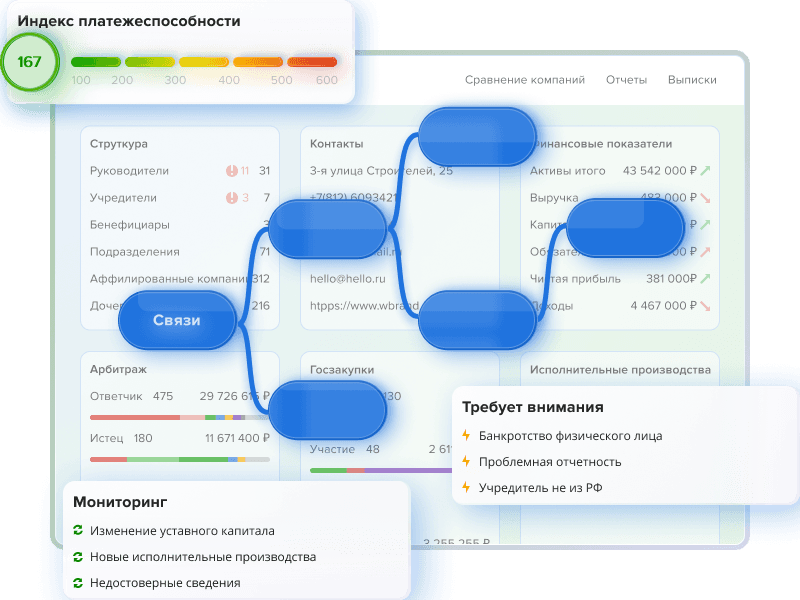
- The received information is automatically displayed on the profile in ELMA365. This allows the employee to review data without switching between different services.
- The interface displays the entity's status and risk indicators, helping to conduct an initial assessment of the counterparty and determine whether further verification is required.
- If the basic information is insufficient for making a decision, the employee can consult additional data or open a generated PDF report containing more detailed information to evaluate the counterparty.
- Information about the verification is saved and can be used for further coordination and decision-making.
Which processes can be automated in ELMA365
With the Globas - Credinform module in ELMA365 you can automate the main steps of counterparty verification:
- searching for companies by Tax ID (INN) and other identifiers
- checking companies and individuals
- receiving basic company information, including its current status
- displaying risk Indexes and factors
- receiving information about bankruptcy, leasing, pledges, patents and significant corporate events
- checking the passport validity
- generating PDF reports
- saving requests and research results in a log
- using pre-designed components from Globas when setting up business processes in ELMA365
The features allow to integrate screenings into various company processes—such as the approval of new counterparties, procurement, or contract management. The specific scenario depends on how processes are organized and what verification rules are applied in the company.
Example
Let us look at the process of approving a new supplier.
The company makes an inquiry in ELMA365 in which an employee fills out the details of a potential counterparty. Once the Tax Id (INN) is entered, the company profile is filled in automatically, and the system retrieves from Globas the organization's status and the metrics prescribed by the regulations.
If there are no critical factors, the request proceeds the approval process. If signs of risk are detected, it is forwarded to a responsible employee. The result and date of the check are saved in the company profile.
The company makes an inquiry in ELMA365 in which an employee fills out the details of a potential counterparty. Once the Tax Id (INN) is entered, the company profile is filled in automatically, and the system retrieves from Globas the organization's status and the metrics prescribed by the regulations.
If there are no critical factors, the request proceeds the approval process. If signs of risk are detected, it is forwarded to a responsible employee. The result and date of the check are saved in the company profile.
It is important to note that automatization does not replace expert assessment. Globas provides data and analytical metrics, while the company itself determines which factors to consider and what actions to take.
The advantage of an out-of-the-box integration solution
A ready-made module eliminates the need to build an integration from scratch, allowing you to use a pre-configured set of functions to work with Globas data within ELMA365. The data set and routing rules can be tailored to the internal corporate procedures.
The ready-made module reduces the scope of initial development. However, implementation period still depends on processes, data composition, and necessary configurations.
Therefore, the best approach is:
A ready-made module eliminates the need to build an integration from scratch, allowing you to use a pre-configured set of functions to work with Globas data within ELMA365. The data set and routing rules can be tailored to the internal corporate procedures.
The ready-made module reduces the scope of initial development. However, implementation period still depends on processes, data composition, and necessary configurations.
Therefore, the best approach is:
- selecting a clear pilot process, such as vetting a new supplier
- determining the necessary data and risk factors
- assigning responsible staff
- testing the scenario using a trial access
Once testing is successful, the integration can be applied to contracts, payments, shipments, and the monitoring of active counterparties.


Globas
Globas.API for your business processes
You can automate the counterparty verification process and retrieve data directly from Globas within your corporate system.
FAQs:
— Which business processes can be automated with the help of Globas.API?
Globas.API enables the integration of counterparty verification into processes that require obtaining and analyzing information about a company or an individual. Globas.API can be used for the approval of new counterparties, procurement, contract management, payments, shipments, and the monitoring of active counterparties.
— How to combine counterparty’s data from external sources with internal information?
Data from Globas can be used alongside the information already stored in corporate systems—such as the history of contracts, payments, and previous screenings, as well as other details about the counterparty. Globas provides external data and analytical metrics, while the company itself determines the rules for their use.
— How does a ready-made module for ELMA365 differ from one developed from scratch?
The ready-made module includes pre-built functions for working with Globas data within ELMA365. This eliminates the need to develop a basic integration yourself and allows you to quickly incorporate the verification process into existing business workflows.
— Where is the best place to start with automatization of verification?
Firstly, you should start with one clear and repetitive process—such as vetting a new supplier. Then determine the data and risk factors required for decision-making, configure the sequence of actions, and test it against real-world scenarios. Once testing is successful, you can apply automation to other processes.
Globas.API enables the integration of counterparty verification into processes that require obtaining and analyzing information about a company or an individual. Globas.API can be used for the approval of new counterparties, procurement, contract management, payments, shipments, and the monitoring of active counterparties.
— How to combine counterparty’s data from external sources with internal information?
Data from Globas can be used alongside the information already stored in corporate systems—such as the history of contracts, payments, and previous screenings, as well as other details about the counterparty. Globas provides external data and analytical metrics, while the company itself determines the rules for their use.
— How does a ready-made module for ELMA365 differ from one developed from scratch?
The ready-made module includes pre-built functions for working with Globas data within ELMA365. This eliminates the need to develop a basic integration yourself and allows you to quickly incorporate the verification process into existing business workflows.
— Where is the best place to start with automatization of verification?
Firstly, you should start with one clear and repetitive process—such as vetting a new supplier. Then determine the data and risk factors required for decision-making, configure the sequence of actions, and test it against real-world scenarios. Once testing is successful, you can apply automation to other processes.